
Spark has become the go-to framework for big data processing, and for good reason: it's fast, versatile, and (once you get the hang of it) surprisingly elegant. But mastering it? That's a whole other story. Spark is packed with features and an architecture that feels simple on the surface but quickly grows in complexity. If you've ever struggled with long shuffles, weird partitioning issues, or mysterious memory errors, you know exactly what I mean.
This article is the forth in a series on Apache Spark — created to help you get past the basics and into the real nuts and bolts of how it works, and how to make it work for you.
Most engineers, even experienced ones, treat partitioning as a default — something that Spark, "just handles". And when it breaks, it doesn't throw a clean error. It just gets … slow. Or starts spilling. Or OOMs, or hits the network harder than it should. Or, it burns 5x the compute for the same workload.
Partitioning isn't just a Spark concept, it's fundamental to data engineering in general. If you're using Spark, Flink, Dask, or even writing your own distributed system — how you split the work always matters.
If you're building data pipelines in Spark and you're not controlling your partitions, you're not in control of your performance. Spark is.
Let's fix that.
A Reminder on Spark and Partitions
Let's rewind for a second.
You may know this already, but Apache Spark is a distributed data processing engine. It lets you run computations across a cluster in parallel, splitting up work so you can chew through terabytes in minutes — not hours. But the real power here isn't just Spark's distributed magic, it's how Spark structures distributed work.
When you launch a Spark job, you're building a DAG — a Directed Acyclic Graph of transformations. Transformations such as filter(), join(), groupBy(), and write(). Spark compiles this logical graph into a physical plan. That plan gets broken down into stages, which are then sliced into tasks.
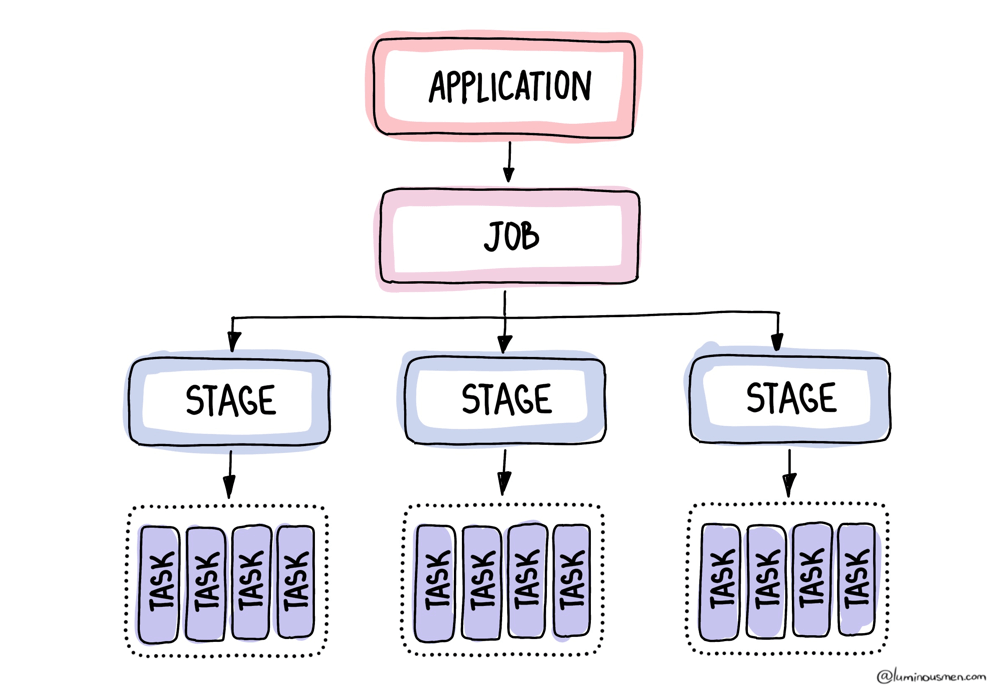
No matter how complex your logic is, at the bottom of the stack, Spark is just executing tasks, and each task works on one partition. Period.
Every partition = one task. One task = one thread.
Once your job starts running, each partition gets assigned to an executor. Executors run tasks one at a time. So if a task gets a huge partition, it'll hog that executor for a while. If your partitions are too tiny, your cluster gets flooded with overhead. If they're too big, a few slow tasks end up dragging down the whole job — causing memory pressure, long runtimes, or worse.
That means your partition count directly controls how much parallelism Spark can squeeze out of your cluster.
Spark redefines partitions multiple times throughout the job. Read from files? That's one way of partitioning. Shuffle after a .groupBy()? That's another.
So let's break it down.
How Many Partitions Do I Need?
Target 128–200 MB per partition after processing. So ceil(total_data_size / 128MB) is your starting count.
Decision tree:
- < 1 GB total — leave defaults. Not worth tuning.
- 1 GB – 1 TB — start with
total_size / 128MB, let AQE coalesce. - > 1 TB — compute manually, consider disabling AQE coalesce for predictable output, use
repartitionByRangefor sorted writes. - Skewed data (one key dominates) — AQE skew join handling (on by default in 3.2+), or salt the key manually if AQE thresholds don't kick in.
- Writing partitioned output (
partitionBy) —repartition("col")before write, or you'll get N×M small files.
In practice: the default 200 shuffle partitions is wrong for most pipelines — either too low (OOM on shuffle) or too high (task startup dominates). AQE fixes the "too high" side automatically. The "too low" side still needs you to look.
Input partitions
As we already know, when you initially read data into Spark, the engine quietly breaks it up into partitions. A partition is a chunk of the dataset that Spark processes as a single unit of parallelism. Each task works on one partition, and together those partitions make up the full dataset. This is the bottom layer of Spark's partitioning story.
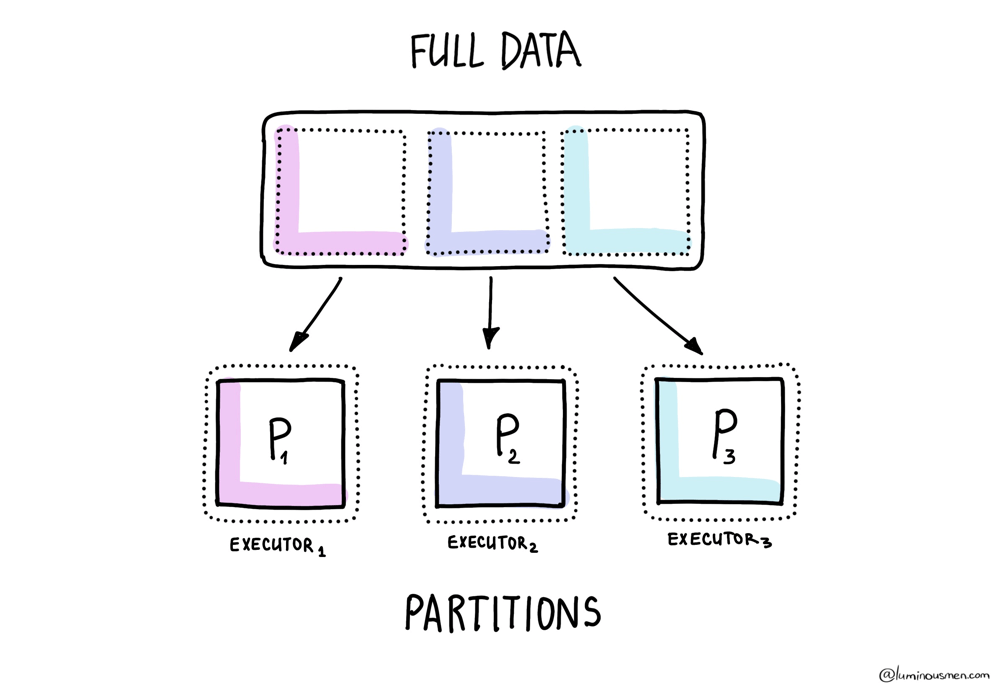
Now, how Spark does this depends on a mix of file format and config values. And yeah, it's a bit of a circus.
For structured formats like Parquet, ORC, or Avro, Spark actually reads the metadata — footers, row groups, that kind of thing — and tries to slice the file in a way that makes sense. Often you'll see one partition per row group, though Spark may merge or split depending on file sizes and configs. Makes sense, right?
For plain-text formats like CSV, JSON, or raw text, Spark partitions data based on file size and the spark.sql.files.maxPartitionBytes setting (128MB by default). It won't split a row in half, but it does chunk files using that size threshold. JSON can be tricky: if it's multi-line JSON, each file becomes a single partition (since it's not splittable). But line-delimited JSON is splittable.
If you're dealing with storage backends like HDFS or S3, you get even more layers of complexity. Block size starts playing a role (fs.blocksize), which you can't always control, especially if you're on managed cloud infra. So now your partitions are dictated by whatever the storage layer felt like doing that day.
Let me throw a couple examples at you. Say you're reading a single Parquet file — 30GB total, and it's got 300 row groups. Spark will split that into exactly 300 partitions. Predictable.
Now imagine you're reading 100 tiny JSON files, each around 2MB. Spark's going to turn that into over a thousand partitions. Why? Because it won't split those files — one file, one partition, every time. Congratulations, you just bought yourself some overhead.
And then there's Kafka and Cassandra, which are different beasts entirely. Partitioning here follows their own logic: Kafka will give you one partition per topic-partition, Cassandra will do it based on token ranges.
None of that matches how you probably want to process the data in Spark.
So, how Spark handles input partitioning depends on the data source. And if you don't control this layer, you might end up with 3 partitions for your entire dataset — or 10,000. Either way, don't expect efficient CPU usage.
Shuffle partitions
Now let's talk about that glorious moment in Spark when everything slows down, fans spin up, and your cluster suddenly turns into a toaster. That moment is called the shuffle.
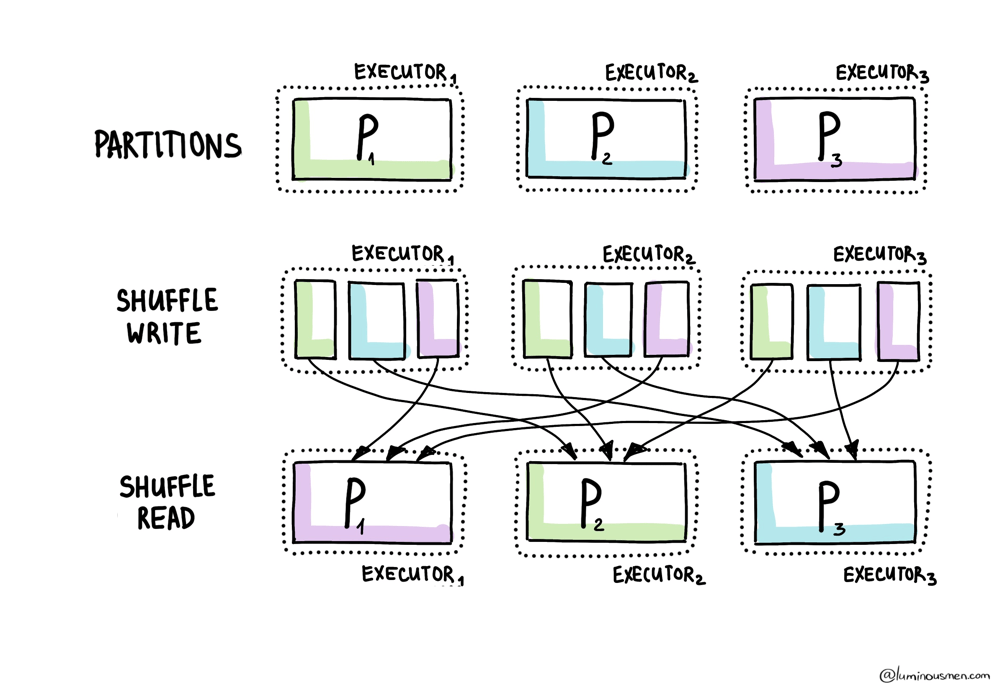
Shuffles happen during wide transformations — things like groupBy(), join(), distinct(), or orderBy(). Basically, whenever Spark needs to move data across executors so that rows with the same key land on the same node. It can't just power through — it has to reshuffle everything. That's when new partitions are born.
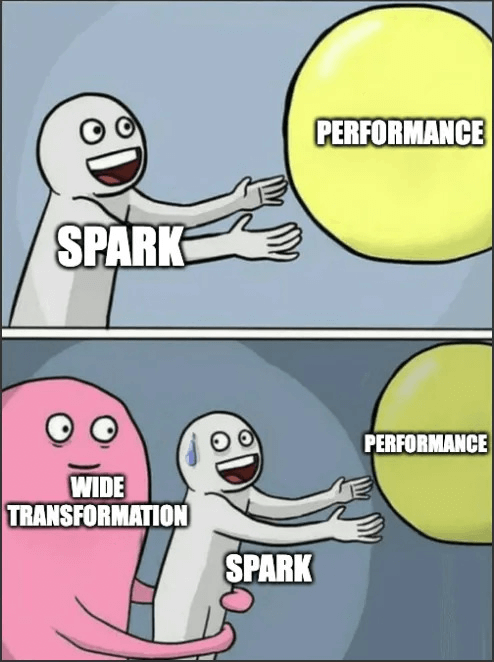
And guess what the default is? 200 shuffle partitions.
Why? Because someone, somewhere at Spark HQ, once set the default:
spark.sql.shuffle.partitions = 200
It doesn't matter if you're dealing with 20MB or 500GB — Spark will happily slice your post-shuffle data into exactly 200 chunks unless you tell it otherwise. Hilarious.
If your data is tiny, say a few megabytes, then those 200 partitions will each get like ten rows. Tasks become microscopic. Most of your CPUs will just be sitting there doing nothing, wasting cluster hours while you pretend it's "distributed computing".
On the other hand, when you're working with hundreds of gigabytes, and still only have 200 shuffle partitions it causes fewer tasks at a time to be processed in executors, but it increases the load on each individual executor and often leads to memory errors.
Also, if you increase the size of the partition larger than the available memory in an executor, you will get disk spills. Spills are the slowest thing you can probably be able to do. Essentially, during disk spills Spark operations place part of the data into a disk if it does not fit in memory, allowing the Spark job to run well on any size of dataset. But, even though it won't break your pipeline, it still makes it super inefficient because of the additional overhead of disk I/O and increased garbage collection.
Output partitions
So you're done with all your joins and filters. Now, it's time to finally write the results somewhere. But what happens when you write? Spark always writes one file per output partition. Period.
Got 200 partitions? You're getting 200 files.
Got 3000? Congratulations, you just wrote 3000 files.
Even if half of those files contain like, three rows — Spark doesn't care. It'll dump them all anyway.
You think you just saved your dataset. In reality, you might have just killed your S3 bucket. Or your BigQuery load job. Or your downstream Spark job that now has to read ten thousand tiny files scattered like confetti across cloud storage.
So yeah — writing is not the end of the pipeline. It's part of the pipeline.
How to Actually Control Them
Spark defaults to 200 shuffle partitions. Not because that's a good number — but because it had to pick something. Because Spark has no clue what your data looks like. It doesn't know that your customer_id is heavily skewed. It doesn't know your files are a mess. It doesn't know that your filters drop 95% of the rows, or that one of your columns is 99% null and turns into a bomb when you group by it.
All it sees is your code.
You write groupBy("country"), and Spark nods along: "HashPartitioner. 200 partitions. Carry on." Except 90% of your data is US, and now one task is hauling a boulder while the rest twiddle their thumbs. That's not parallelism. That's just dumb.
And that's why you have to take control.
Shuffle partitions
spark.sql.shuffle.partitions, this little config controls how many partitions Spark creates during wide stages — join(), groupBy(), aggregations. If you don't touch it, Spark sticks with 200. Doesn't matter if you're joining 5MB or 5TB.
You can crank it up or down with:
spark.conf.set("spark.sql.shuffle.partitions", "600")
How do you pick the right number? There's no magic formula, but if your tasks are processing 3GB each and spilling all over the place, you probably need more partitions. If they're running for 2 seconds each and writing tiny files, probably less. Somewhere around 100–200MB per task tends to work well — but again, you know your data. Spark doesn't.
Repartition
This is Spark's "start over" button. It forces a full-on shuffle and redistributes the data however you tell it to — by number of partitions, or by key. It's a full-blown network operation, with serialization, temp files, and a whole lot of I/O. You're throwing the data into the air and letting Spark reshuffle the deck.
It's expensive. It's also sometimes necessary.
For example, after a heavy filter.
Let's say you start with a massive dataset — Spark gives you 2000 partitions. Then you apply a filter and keep 5% of the rows. Spark doesn't care. It keeps the same 2000 partitions, now mostly empty. You end up with thousands of tiny tasks doing nothing, or thousands of micro-files dumped into S3.
Fix it:
cleaned = df.filter(...).repartition(100)
Now you have real partitions again — enough to parallelize, not enough to waste resources.
Another popular example, when you're sending data downstream — to a model trainer, a multi-node write, a batch load.
If your partitioning is uneven, downstream parallelism collapses. One node gets 10GB, others get peanuts. Spark can't fix this for you. If you want balance, you have to force it:
prepared = df.repartition(200)
In both cases, repartition() gives you control where Spark won't. You're paying for predictability — and that's usually a fair trade.
Coalesce
At the other end of the scale is coalesce().
Where repartition() is a full reshuffle, coalesce() is a quiet merge. It takes existing partitions and fuses them — no data movement, no shuffle. It's almost always used at the end of a pipeline, right before writing to disk.
Say Spark left you with 3000 partitions. You write that to S3, and congrats — now you've got 3000 tiny files. Great if your goal is to make downstream analysts hate you.
So you do this:
df.coalesce(100).write.parquet("s3://bucket/output/")
Simple. Now you've got 100 reasonably sized files. S3 thanks you. Presto thanks you. Your cloud bill thanks you.
But don't push it too far. People see coalesce(1) and think, "Nice — one output file". Except now you've killed parallelism — one executor is doing all the work. The rest are idle.
Even worse, coalesce() doesn't rebalance data. It just stacks partitions on top of each other. So if your original partitions were uneven, they still are — just lumped together.
There is a trick though:
df.coalesce(50, shuffle=True)
This acts more like a repartition, but leaning toward reduction. It's not free — you pay for the shuffle cost — but you get better distribution and fewer partitions.
repartitionByRange(N, "col") partitions by value ranges instead of hash. Use it when:
- You're writing sorted output and want each file to cover a contiguous range.
- Downstream consumers do range filters on the column (predicate pushdown benefits).
- Hash partitioning is producing skew on the key and salting isn't an option.
It costs a sample pass to figure out range boundaries, so don't use it for small datasets — the overhead isn't worth it.
repartitionByRange
repartitionByRange(N, "col") partitions by value ranges instead of hash. Use it when:
- You're writing sorted output and want each file to cover a contiguous range.
- Downstream consumers do range filters on the column (predicate pushdown benefits).
- Hash partitioning is producing skew on the key and salting isn't an option.
It costs a sample pass to figure out range boundaries, so don't use it for small datasets — the overhead isn't worth it.
Custom Partitioning
Now, there's also partitionBy() — but don't confuse it with actual Spark partitions. This one is about physical layout on disk. It's what decides how your data gets saved into folders.
If you write:
df.write.partitionBy("region").parquet(...)
Spark splits the output into folders like region=US/, region=EU/, and so on. But this has nothing to do with memory partitions or parallelism. If you want those files to be cleanly separated — one file per region — you still need to do:
df.repartition("region").write.partitionBy("region").parquet(...)
Otherwise, you'll get a mess: dozens of tiny files per region, randomly scattered. Which defeats the whole point.
Dynamic Partition Pruning
Since Spark 3.0, joins against a partitioned table can prune partitions at runtime based on the other side of the join. If you have a fact table partitioned by date and you join it against a small dim filtered to last 7 days, DPP reads only those 7 date partitions — even though the filter is on the other table.
Enabled by default via spark.sql.optimizer.dynamicPartitionPruning.enabled=true. It requires a broadcast hash join on the build side, so the dim table has to be small enough to broadcast (spark.sql.autoBroadcastJoinThreshold, default 10 MB).
If you see full scans on joins where you expected pruning, check:
- The dim side is actually getting broadcast — look at the physical plan for
BroadcastExchange. - The partition column on the fact table is the join key.
- The fact table is actually partitioned on disk (not just
partitionByin the DataFrame API on read).
What about Adaptive Query Execution?
Since Spark 3.0, there's been this thing called Adaptive Query Execution (AQE) — a smarter layer on top of the regular SQL planner. It can change the physical plan while your query is running, based on what's actually happening.
Sounds amazing, right?
It is — up to a point.
Well, it can be. But you still have to know how it works, and when it doesn't.
AQE can merge tiny shuffle partitions, split skewed ones, and even switch join strategies on the fly. It's Spark learning as it goes. For open-source Spark ≤3.3, you need to turn it on explicitly; for newer versions and most Databricks environments, it's already enabled:
spark.conf.set("spark.sql.adaptive.enabled", "true")
spark.conf.set("spark.sql.adaptive.coalescePartitions.enabled", "true")
spark.conf.set("spark.sql.adaptive.skewJoin.enabled", "true")
spark.conf.set("spark.sql.adaptive.shuffle.targetPostShuffleInputSize", "64MB")
Once enabled, Spark starts adapting at runtime — not during planning, but while the job is running.
You filter 2TB down to 50MB, and instead of blindly running 200 tasks and writing 5000 files, Spark notices and gives you 3 tasks. You group by a skewed key and Spark slices that one overloaded partition into smaller pieces so your stage doesn't hang for an hour. It's the first time Spark feels like it's paying attention.
But AQE only kicks in after the first shuffle. It won't help you with garbage input partitioning, bad file layouts, or anything you've explicitly told Spark to do. If your source data has wrong stats — say, compressed JSON or Kafka streams — AQE might even make things worse. And since it adjusts plans at runtime, explain() might show you one thing, and the Spark UI might do something else entirely.
So no, AQE isn't magic. It's a smart assistant, not a mind reader.
It helps polish your plan — it doesn't design it for you. You still need good partitioning fundamentals. AQE just makes the edges smoother.
Wrapping it up
- Input partitions: Spark guesses how to split files based on format, size, and config. Sometimes it gets it right. Often it doesn't. Especially with JSON, Kafka, and weird file layouts. You need to know what's happening under the hood.
- Shuffle partitions: 200 is not a sacred number, it's a default. And like all defaults, it's wrong 80% of the time.
- Output partitions: Every partition = one output file. You write 3000 partitions? You get 3000 files. Coalesce or repartition before writing.
- Repartition(): Use it when your data got filtered/skewed and you want a fresh, even split. It's expensive but sometimes necessary.
- Coalesce(): Use it when you want fewer files, and you trust your data is already nicely distributed. Use it before writes. Don't overdo it.
- partitionBy(): Controls how data is written to disk. Not how it's processed in memory. Don't confuse the two.
- AQE: It's smart. Smarter than the old planner. But it's not a mind reader. Think of it like auto-correct — helpful, but you still need to know how to spell.