
Spark has become the go-to framework for big data processing, and for good reason: it's fast, versatile, and (once you get the hang of it) surprisingly elegant. But mastering it? That's a whole other story. Spark is packed with features and an architecture that feels simple on the surface but quickly grows in complexity. If you've ever struggled with long shuffles, weird partitioning issues, or mysterious memory errors, you know exactly what I mean.
This article is the fifth in a series on Apache Spark — created to help you get past the basics and into the real nuts and bolts of how it works, and how to make it work for you.
Most Spark engineers use caching without actually knowing how it works. Not because they're lazy, but because Spark makes it look simple. Under the hood, caching is tightly coupled to how Spark handles plans, Spark memory management, partitions, and block-level execution. Miss one of those details, and Spark will ignore your cache, drop it, or recompute the entire DAG from scratch without saying a word.
This post isn't about what .cache() does. It's about what Spark actually does when you call it, and all the reasons your cache might not behave the way you think.
Recap
Before we touch caching, let's remind ourselves how Spark thinks.
At its core, Spark builds everything on top of RDDs (Resilient Distributed Datasets) , which are immutable collections of records split across your cluster. Think of RDDs as the assembly language of Spark: everything higher-level (like DataFrames or Datasets) eventually compiles down to RDDs and their operations.
When you write a Spark job, you're either transforming data (via transformations like map, filter, join) or triggering actions (count, take, collect). Transformations are lazy — they don't do anything when you define them. Instead, Spark just builds a DAG of steps it could run, like a to-do list for later. It's only when you hit an action that Spark wakes up and starts actually executing the DAG to produce a result.
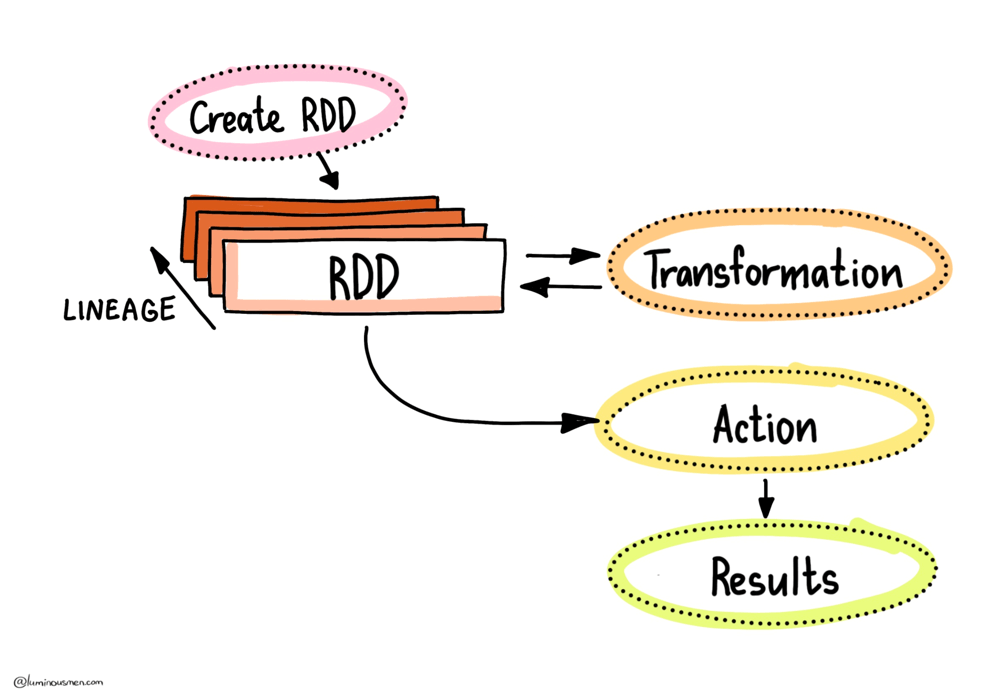
But once that action is done, Spark throws away the intermediate results. Poof — gone from memory. If you later run another action on the same logic — say, you do .count() a filtered DataFrame and then .show() it — Spark will re-run the entire DAG from the original source. That might mean fetching a terabyte of data from S3, reading from Kafka, or doing expensive decompression on disk. None of this is free, and if you repeat that logic in multiple places — like in two different branches of your pipeline — you're basically signing up to recompute everything from scratch multiple times, burning time and cluster resources.
This is where caching enters the picture. Or rather — should. But as we'll see next, it's not always as straightforward as calling .cache() and calling it a day.
Caching in Spark
Let's get one thing out of the way first: Spark will recompute things as many times as you ask it to, unless you explicitly tell it not to.
This might sound obvious, but it's a common source of confusion for folks expecting Spark to "remember" results just because the logic hasn't changed. It will not. Every time you call an action on an uncached DataFrame or RDD, Spark starts from the source and rebuilds all intermediate steps — even if you already did the exact same thing 5 seconds ago (according to the 5-second rule).
To prevent this waste, Spark offers two tools: .cache() and .persist(). Both let you tell Spark that you are probably going to need this data again in the future. The difference is in how and where the data gets stored.
.cache() is the friendly one-liner. Internally, it's just shorthand for .persist(StorageLevel.MEMORY_AND_DISK), which means Spark will try to keep the data in RAM. But if that fills up, it'll spill evicted blocks to disk. You get some performance benefits without risking immediate OutOfMemory errors.
If you need more control, you use .persist() and pick a StorageLevel. There's a whole zoo of these, and they're worth understanding — especially when you're tuning long-running pipelines or squeezing performance out of memory-starved clusters.
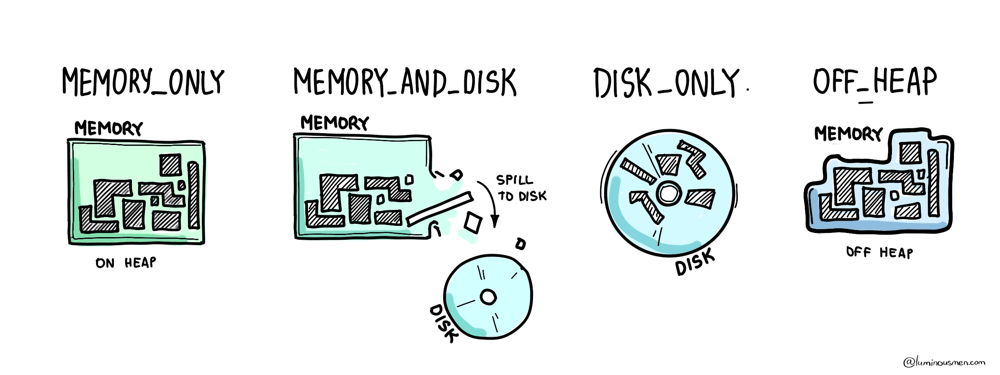
At the simple end, you've got MEMORY_ONLY, which stores raw, unserialized objects in RAM — fast, but risky. If memory runs out, Spark just evicts blocks, and you're on your own. Then there's MEMORY_AND_DISK, which gives you a safety net by backing up evicted blocks to disk. You can also go with the serialized variants (_SER), which store data as byte arrays instead of full JVM objects — reducing memory usage and garbage collection pressure, but increasing CPU cost due to (de)serialization.
For cold-storage-style caching, there's DISK_ONLY, which doesn't even try to use memory. And if you're dealing with native code or need to avoid the JVM heap entirely, there's OFF_HEAP, which pushes data out of the garbage collector's reach altogether.
Now here's what this looks like in practice:
df = spark.read.parquet(data_path)
df.cache()  # marks for caching (lazy)
df.count()  # materializes the cache
df.is_cached  # True
df.count()  # uses cached data
df.storageLevel  # StorageLevel(True, True, False, True, 1)
df.unpersist()  # manually clears it
.cache() doesn't do anything until you trigger an action. It just marks the plan as cacheable. Only when Spark actually executes a full pass over the data — for example, during a .count() action — will it start caching partitions as they're computed.
You can do the same with temporary views, which is sometimes cleaner when working with Spark SQL-style APIs:
df.createOrReplaceTempView("df")

spark.catalog.cacheTable("df")
spark.catalog.isCached("df")  # True
spark.catalog.uncacheTable("df")
spark.catalog.clearCache()
So, does caching make things faster?
The answer, of course, is: sometimes.
When used correctly, caching can be a massive win — especially in iterative jobs (like ML workflows), interactive analysis, or when you're branching logic and reusing intermediate results. But misuse it — say, by caching everything just because it "seems safe" — and you'll tank memory, increase garbage collector (GC) time, and possibly make things worse.
The trick isn't just to use caching. It's to know when it helps and what is actually being cached. Spark will happily let you believe something is cached, and then silently recompute everything anyway if you break its assumptions. We'll get to that next.
Caching Behavior
So you've called .cache(), maybe even .persist(), and you're expecting Spark to behave like a good little compute engine and reuse your precious data instead of recomputing it. Seems simple, right? Just stash the data and read it back later.
Well... not quite.
Let's talk about what actually happens under the hood — starting with the thing that controls all of this: CacheManager.
When you mark a DataFrame to be cached, what Spark really does is modify the logical plan of your query by wrapping it in a special logical operator called InMemoryRelation. This isn't some background process — it's part of Spark's planning pipeline. Specifically, this wrapping happens after the analyzer phase, but before optimization. In other words, the cache is tied to the analyzed logical plan, not the final optimized one. And this is where things get tricky.
Let's walk through a real example:
df = spark.read.parquet(path)
df.select("col1", "col2").filter("col2" > 0).cache()
df.filter("col2" > 0).select("col1", "col2")
Now, if you've worked with Spark optimizations before, you're probably thinking: "Hey, those two queries are semantically the same. The optimizer will push down the filter either way. The final execution plan should be identical".
And you'd be right — but that doesn't matter.
Because again: caching happens before optimization. The second query has a different analyzed plan than the first, even if the optimizer will eventually produce the same physical plan. Spark will look at the analyzed plan of your current query, compare it to the analyzed plan that was cached, and if they don't match exactly — it will skip the cache and recompute everything.
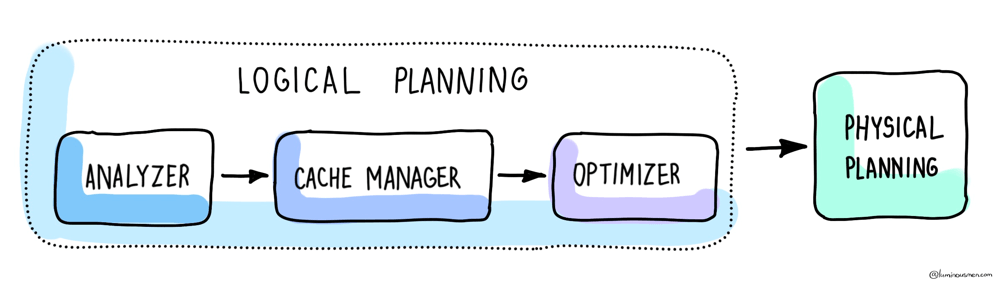
This is why you can "cache something" and then later run what looks like the same query — and Spark still redoes the work. And unless you know this, it's incredibly easy to shoot yourself in the foot (or other sensitive areas).

Block-Level Reality
So far, we've been talking about caching at the level of DataFrames, queries, logical plans — the kind of stuff you see in code. But underneath all that, Spark doesn't think in terms of "DataFrames". It thinks in blocks. And understanding how block-level caching works will save you from some very expensive surprises.
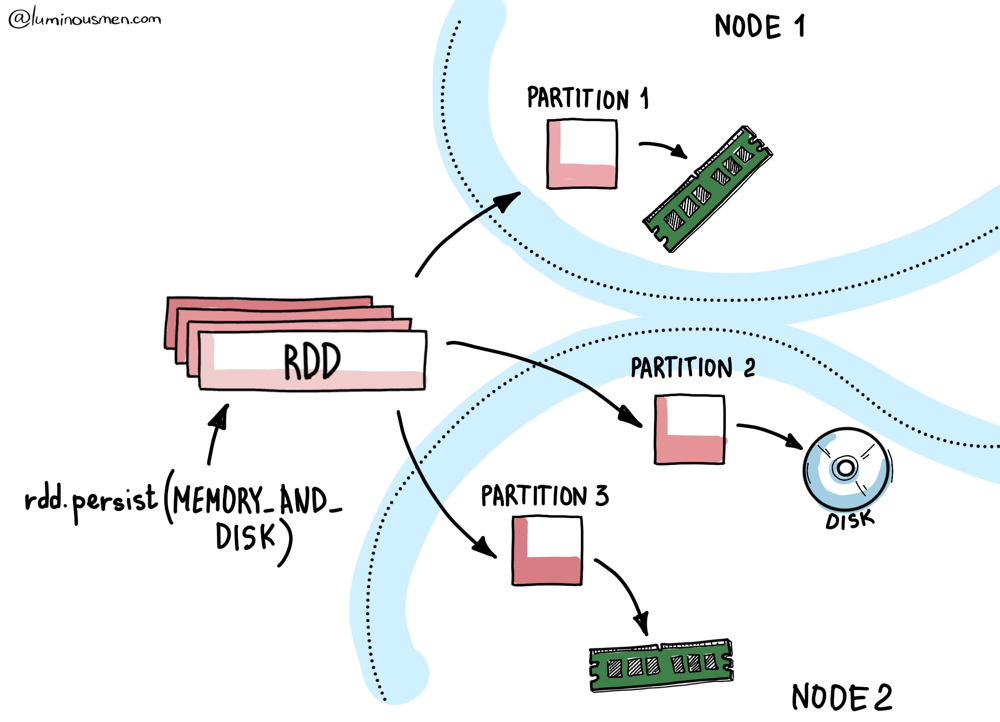
Every RDD (and by extension, every DataFrame) is made up of partitions. Each partition maps to a block, and these blocks are the actual units of caching in Spark.
Let's say you run a .cache() followed by a .count(). Spark will compute every partition, and as each partition is computed on a given executor, the resulting block is stored by that executor's local BlockManager. That BlockManager decides where and how to store the block — in memory, on disk, serialized, off-heap — depending on the StorageLevel you set.
But the important part is this: caching happens locally and incrementally.
There's no centralized controller orchestrating "cache this entire dataset". Each executor only caches the blocks it computes. And it only caches them when they're computed. No data is prefetched or broadcasted unless you explicitly tell Spark to do so.
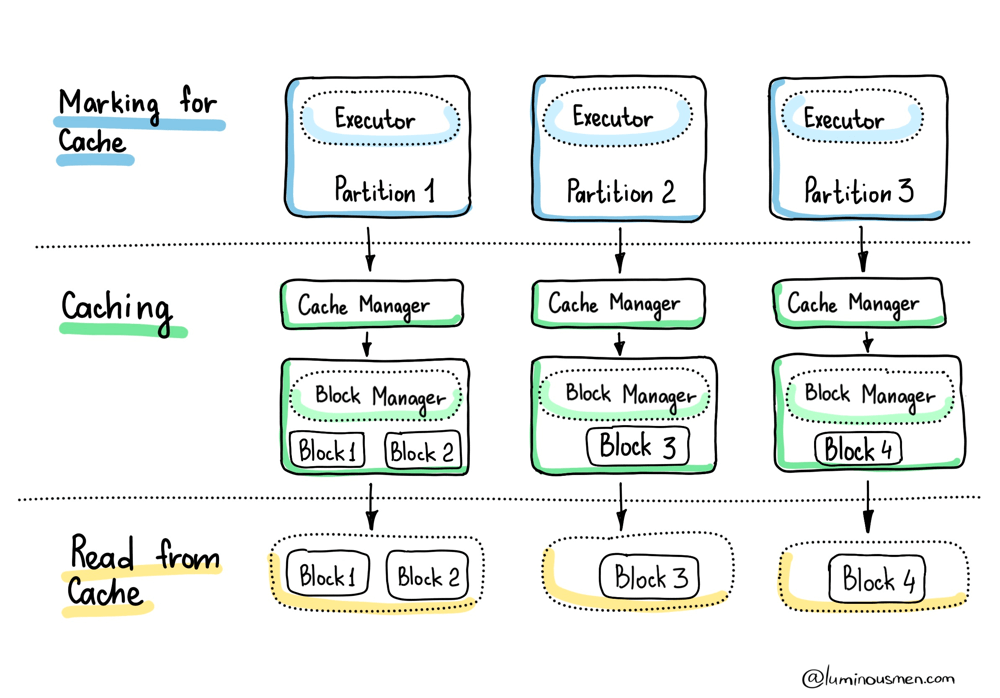
This has two major implications:
First, if a block is computed on Executor A, then cached, and Executor A goes down before you reuse that block — Spark will have to recompute it. Unless you used a replicated storage level like MEMORY_AND_DISK_2, the data's just gone. This is why block replication exists — not for performance, but for fault tolerance.
Second, the only blocks that get cached are the ones Spark was forced to touch. If your action only scans a subset of the dataset — think .take(10), .limit(100), or any filtered scan — then only those blocks will be materialized and cached. The rest? Still lazily waiting. So unless you run an action that touches every partition (like .count() or a full write), you're working with a partial cache at best.
Even worse, Spark won't warn you about any of this. There's no built-in visibility into how much of your DataFrame is actually cached, or how much has already been evicted. You're flying blind unless you hook into metrics yourself or use third-party observability tools.
Eviction
Now, let's talk memory. The BlockManager doesn't get to use the whole heap. Spark allocates a chunk of the JVM memory for execution and storage via spark.memory.fraction, and then further splits that chunk between caching and temporary execution data using spark.memory.storageFraction. We covered that in the Spark memory management deep dive — specifically how spark.memory.fractionandspark.memory.storageFraction carve up the heap.
And that means one thing: you're always fighting for memory.
That means your cache competes directly with joins, aggregations, and shuffles for memory. And Spark will steal from the cache if an active task needs more execution memory. Spark will happily start evicting cached blocks to make room. Your nicely cached block you spent 5 minutes reading that data from S3? Gone. Evicted mid-job. No warning.
Spark uses a Least Recently Used (LRU) eviction strategy. If memory gets tight, it starts dumping the oldest or least-used blocks to make room. If you're using a disk-backed storage level (like MEMORY_AND_DISK), Spark will spill evicted blocks to disk. If you're not — say, you used MEMORY_ONLY — those blocks are just gone. And Spark will recompute them later if needed.
To make this worse, Spark doesn't wait until your next action to evict things — blocks can be kicked out of memory before you ever reuse them, especially on busy clusters or long-running jobs. So just because you called .cache() doesn't mean your data is still around.
In the best-case scenario, if you're using something like MEMORY_AND_DISK_SER, Spark will spill those evicted blocks to disk, and pull them back in later. You'll pay the disk I/O cost, but avoid recomputing from source.
In the worst case — say, you used MEMORY_ONLY — those blocks are gone for good. The next time you need them, Spark has to go all the way back to the source and rebuild the full DAG.
Here's the kind of warning you might see when that happens:
WARN org.apache.spark.sql.execution.datasources.SharedInMemoryCache:
Evicting cached table partition metadata from memory due to size constraints
(spark.sql.hive.filesourcePartitionFileCacheSize = 262144000 bytes).
Translation: something else needed the memory more than you did, and your cached data got sacrificed.
So if you're running a big job on a small cluster, or working with long pipelines where memory pressure fluctuates — don't assume your cache is still intact. Spark gives you no guarantees. It's a best-effort system. Useful? Absolutely. Predictable? Only if you know what's happening behind the curtain.
To Wrap It Up
Caching is one of those Spark features that everyone uses, few people understand, and most overuse. It's easy to reach for it — because at a glance, it feels like a no-brainer. Why wouldn't you want to avoid recomputation? Why wouldn't you want your pipeline to go faster?
But caching isn't about calling .cache() and moving on. It's about systems thinking — knowing what actually happens under the hood when you ask a cluster to keep data around for you. You have to know how it works. You have to test under pressure. You have to assume the cache will disappear at the worst possible time and make sure your system handles that gracefully. If caching is part of your performance strategy, make sure it's backed by either disk or replication — and design your jobs assuming eviction will happen. Because sooner or later, it will.