I've made every dumb Spark mistake at least once. At production scale — real data, real concurrency, real stakeholders yelling in Slack — "it works" and "it works well" are completely different conversations. So I started writing them down.
This is the checklist I wish I had taped to my monitor when I started. Every item comes from a real production screwup — mine or someone else's.
Before You Write a Single Line
- Use the DataFrame / Dataset API, not RDDs. RDDs are lambda-driven — Spark can't see inside them, can't optimize them. DataFrames go through the Catalyst optimizer. You get predicate pushdown, filter reordering, Adaptive Query Execution, and cost-based join reordering for free. The RDD API in MLlib is in maintenance mode. Let it go.
- Pick the right file format. Parquet for analytical queries — column pruning, predicate pushdown, stats-based skipping all work out of the box. Avro for schema-evolution-heavy ingestion. For anything read more than once in the same week, use a table format on top — Iceberg or Delta — so you get ACID, time travel, and stats the query planner can actually use. If you're reading raw CSV or JSON, always specify the schema explicitly. Inference means a full scan just to figure out types.
- Use splittable compression. Snappy, LZ4, or ZSTD — never GZIP. A 10GB GZIP file can't be split across executors – one poor node has to decompress the whole thing. Snappy is the reliable default. ZSTD is higher-compression and, as of Spark 4.x, runs in parallel for shuffle (SPARK-46256) — use it for shuffle spill and intermediate files to cut network time.
- Know your Spark version. Spark 4.0 dropped Scala 2.12, JDK 8, JDK 11, Mesos, and Python 3.8. If your platform team is still on any of those, that's the first fight to pick — the rest of this checklist assumes you're on JDK 17, Scala 2.13, and Python 3.9+. Don't tune a job on a platform that's already a stage behind.
Partitioning — Hidden Architecture
- Tune
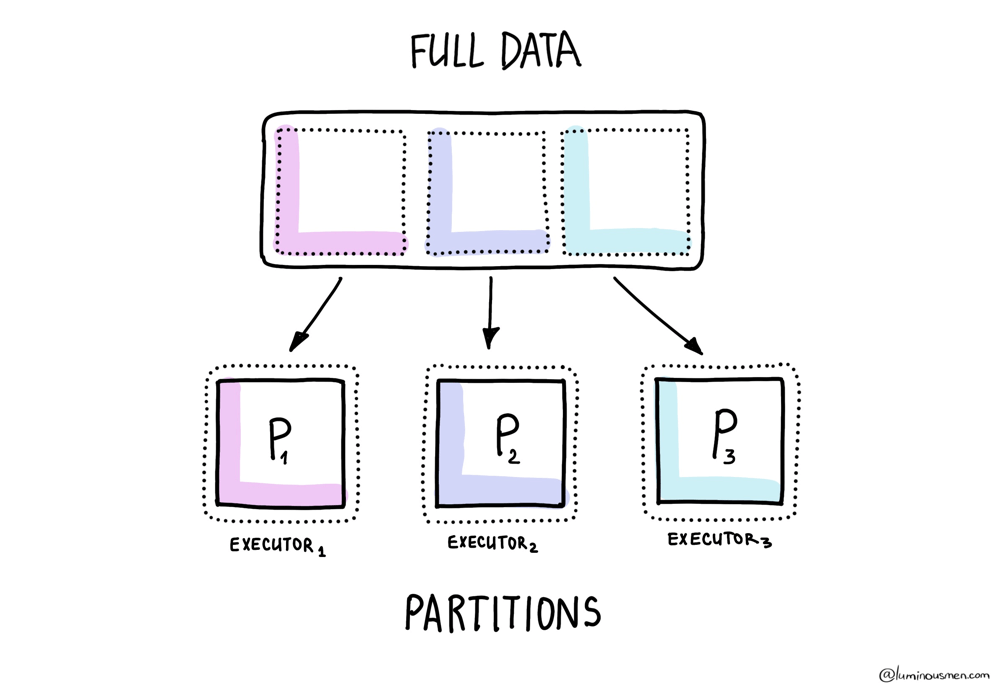
spark.sql.files.maxPartitionBytesfor your storage layout. Default is 128 MB. If your Parquet files are mostly 256 MB+, you're under-parallelizing reads. If they're 8 MB, you've got too many tasks. Match the split size to your actual file distribution, not the Spark default. This is the input-side knob — it sets your initial partition count before any AQE coalescing kicks in. - Target 2-4 partitions per available core. Fewer than that and cores sit idle. More than that and the scheduler spends more time tracking tasks than running them. If tasks routinely finish in under 100ms, your partitions are too small. If one task runs 10x longer than the others, you have skew — see the joins section.
- Filter early, filter hard. Push filters as close to the data source as possible. Partition pruning exists for a reason — if your data is partitioned by date and you only need last week, Spark should never touch the other 51 weeks. With Dynamic Partition Pruning (default-on in 4.x), this also works at runtime across joins. Which brings me to the next point.
- [4.x] Use multi-key Dynamic Partition Pruning for compound partitions. SPARK-46946 added multi-key DPP. If your fact table is partitioned by (date, region) and you join it against a small filtered dim, Spark now prunes on both keys at runtime. This unlocks real star-schema performance that was 3.x-impossible. No config needed — it just works if the dim side broadcasts.
- Coalesce after heavy filtering. You just filtered 2 billion rows down to 2 million but still have 10,000 partitions. That's 10,000 nearly-empty tasks.
.coalesce()fixes this without a full shuffle..repartition()if you need even distribution across the new partition count. AQE's coalescePartitions handles shuffle-output coalescing automatically, but won't help on input-side partition count after filter. - Repartition on join keys before multiple joins. If you're joining the same DataFrame three times on user_id, repartition on user_id once and cache it. Otherwise you're shuffling the same data three times. Better: if the table is long-lived, bucket it — see the joins section.
- Repartition after
flatMap. flatMap can 10x your row count without touching the partition count. Now you have massively uneven partitions. Repartition explicitly or enjoy your disk spills. - Use
.partitionBy()on writes when downstream jobs filter on those columns. Limit partitioned columns to low-cardinality (≤ a few hundred distinct values)..partitionBy("user_id")on a user table is a disaster — millions of tiny directories..partitionBy("date")on daily data is the canonical right answer.
Memory
- Know your memory layout. Default: 60% of executor memory for execution + storage (
spark.memory.fraction), split 50/50 (spark.memory.storageFraction). The remaining 40% is user memory. Don't blindly increase executor memory — understand which pool is running out first. The Spark UI's Storage tab tells you what's cached; the Executors tab tells you what's in use. - For PySpark: bump
memoryOverheadto 20–25%. Default is 10% or 384 MB. Arrow and pandas UDFs allocate native memory that doesn't show up in JVM metrics. Your executor gets killed by YARN or Kubernetes and you have no idea why. This is why. - Don't collect on the driver.
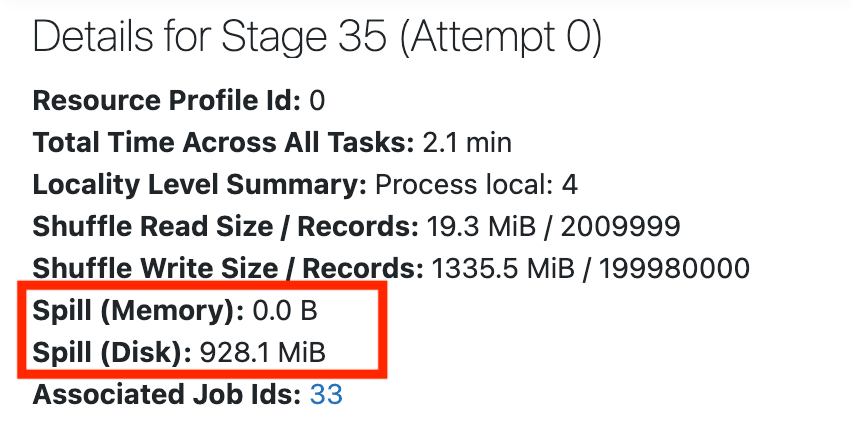
df.collect()pulls the entire dataset to a single machine. Use.take(),.takeSample(), or.show(). Same goes for.countByKey(),.countByValue(),.collectAsMap()— all driver-side. Spark logs a warning when task serialized size exceeds 1 MB (TASK_SIZE_TO_WARN_KIB = 1000); pastspark.driver.maxResultSize(1 GB default), it errors out. - Watch for disk spills. Check the Spark UI's Stages tab. If you see "Spill (Memory)" or "Spill (Disk)" on a stage: reduce data per partition (more partitions), increase executor memory, or both. Spills mean your data didn't fit and Spark wrote intermediate results to disk. That's 10-100x slower than in-memory.
- Use off-heap memory for big shuffles. Set
spark.memory.offHeap.enabled=trueandspark.memory.offHeap.sizefor jobs doing heavy shuffles or joins. Off-heap bypasses GC pressure and is more predictable. But you pay for it with a fixed allocation — but worth it for anything that spills regularly.
Caching — It's Not Free
- Only cache what you reuse. Caching a DataFrame you touch once just wastes memory that could go to shuffles and joins. Cache when you have branching logic, iterative ML workloads, or multiple actions on the same data.
- Force materialization after caching.
.cache()is lazy. Until you trigger an action, nothing is cached. Always follow with.count()or a full action. Otherwise you think you cached it, but you didn't, and your next job re-computes everything. - Use
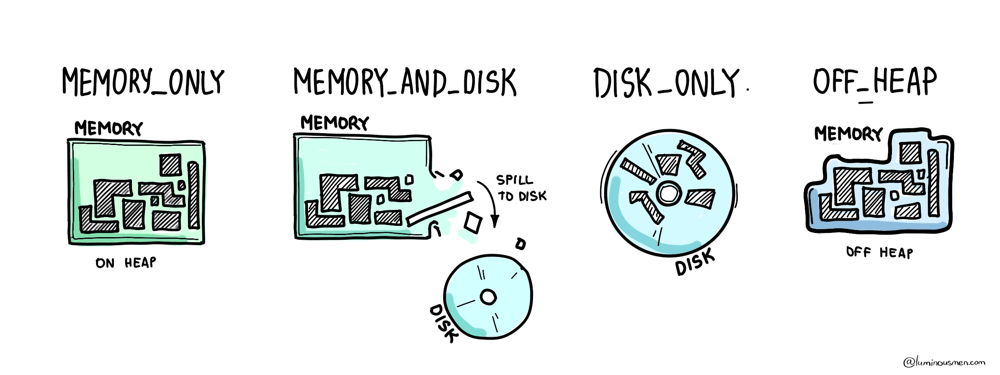
MEMORY_AND_DISKas your default storage level. PureMEMORY_ONLYmeans data gets evicted silently when memory fills up.MEMORY_AND_DISKspills to disk instead of recomputing. That's almost always what you want. - Assume your cache will be evicted. Cache competes with execution memory. Spark uses LRU eviction and won't warn you when it drops your cached blocks. Design your job so it's correct even without the cache — cache is for speed, not correctness.
- Beware partial caching.
.cache()followed by.take(10)only materializes the partitions Spark touched to get 10 rows. The rest is uncached, and the next action recomputes them without warning. Always cache with a.count()or full action first.
Joins — The Biggest Shuffle of Your Life
- Broadcast small tables. If one side of your join is under
spark.sql.autoBroadcastJoinThreshold(10 MB default), Spark broadcasts it — no shuffle, no exchange, just a hash lookup on every executor. For medium dims (10-200 MB), consider raising the threshold or using.broadcast(df)explicitly. Past 200 MB, broadcasting costs more than it saves. - Diagnose skew before you "fix" joins. Open the Spark UI, go to the Stages tab, look at the task duration distribution. If 99 tasks finish in 2 seconds and 1 takes 40 minutes, you have skew. AQE's skewJoin handling (default-on in 4.x) covers most cases automatically. If it doesn't trigger: broadcast the small side, salt the join key, or do an iterative broadcast join.
- [4.x] Use Storage Partition Join for pre-partitioned tables. If both sides of a join come from a DSv2 source (Iceberg, Delta) and are partitioned on the same columns, SPJ (SPARK-51938 improvements in 4.x) skips the shuffle entirely. Set
spark.sql.sources.v2.bucketing.enabled=true. This is the single biggest shuffle-elimination feature in Spark 4.x and it's criminally underused. - Bucket your tables when SPJ isn't an option. For Hive-style writes, pre-bucket both tables on the join key with the same bucket count. Spark skips the shuffle on subsequent joins. Older pattern than SPJ but still relevant for non-DSv2 sources.
- Order joins smallest-first when AQE isn't picking up slack. AQE reorders most joins automatically based on runtime stats, but if you're outside AQE's reach (e.g. RDD path, or a shuffle-heavy plan that AQE can't retry), put the smallest table first in your explicit join chain.
JDBC Sources
- Set
numPartitionsfor parallel reads. Default JDBC reads load everything into a single partition on a single executor. Set.option("numPartitions", N)with.partitionColumn(),.lowerBound(), and.upperBound()to parallelize. This can be the difference between a 2-hour read and a 5-minute read. - Use predicates for non-numeric partitioning. If your partition key isn't a clean numeric range, pass an array of SQL WHERE clauses via
.option("predicates", ...). One task per predicate, hand-sized ranges. Ugly but effective. - Push down what you can, don't trust the driver to do it for you. Spark pushes basic filters (column equality, IN, IS NULL) to JDBC automatically, but anything with a computed column or cast won't push and will get evaluated in Spark after the full read. For complex predicates, write the filter explicitly in a query option instead of relying on pushdown.
What Spark 4.x Actually Changed
Source: Databricks blog
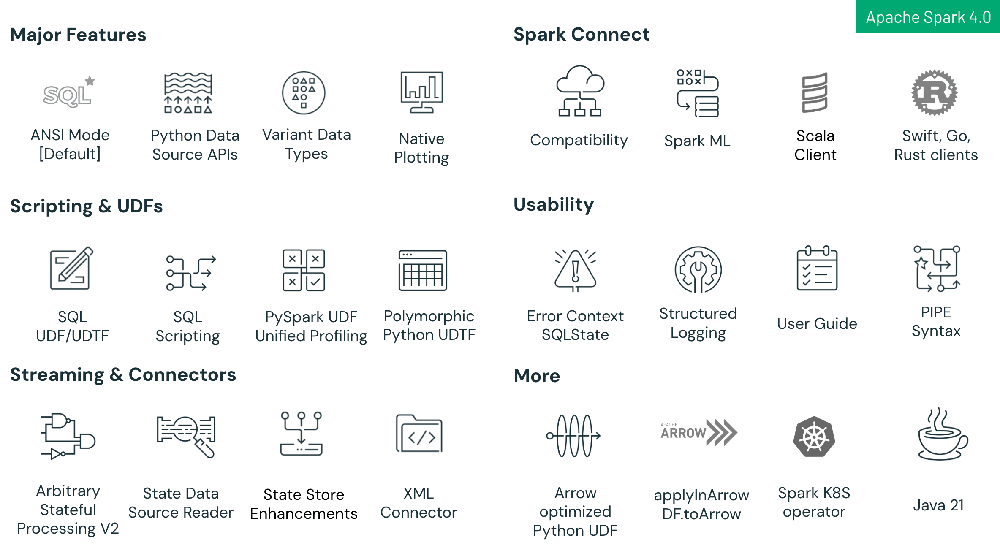
These items used to require config flags. In 4.x they're on by default. If you're copy-pasting old configs forward, some are now redundant and a couple are quietly doing the opposite of what you think.
- [4.x] AQE is default-on. Stop toggling it. spark.sql.adaptive.enabled=true is the default since 3.2. If you're copy-pasting configs that explicitly set it, trim them. What to care about instead: adaptive.coalescePartitions.parallelismFirst (default false — set true if you want AQE to prioritize parallelism over partition size), and the skew join thresholds if your data is unusual.
- [4.x] DPP is default-on, and now multi-key. Same story — stop toggling dynamicPartitionPruning.enabled. The upgrade that matters in 4.x is SPARK-46946: DPP now broadcasts multiple keys, so joins against compound-partition fact tables prune at runtime.
- [4.x] RocksDB is the default shuffle service DB backend (SPARK-45351). If you run external shuffle service with a database backend, this changed under you. Usually a win, but worth checking your ESS metrics after upgrade.
- [4.x]
spark.shuffle.service.removeShuffleis default-on (SPARK-47448). Shuffle data is cleaned up automatically when referenced RDDs are GC'd. Your "cluster disk fills up after long jobs" problem from 3.x is probably gone. If it isn't, check your lineage — something is holding references. - [4.x] Parallel ZSTD/LZF for shuffle compression. SPARK-46256 and SPARK-48518. If you're still on default Snappy for shuffle compression, you're leaving CPU parallelism unused on modern multi-core executors. Set
spark.shuffle.compress=true(default) andspark.io.compression.codec=zstd. - Kryo vs Java serializer — still worth it. Default is still Java, which is 2-10x slower and larger on the wire.
spark.serializer=org.apache.spark.serializer.KryoSerializer. You pay this cost on every shuffle. Register your custom classes (spark.kryo.classesToRegisterorspark.kryo.registrator) or Kryo silently falls back to Java for unregistered types.
Before You Ship to Prod
- Actually read the Spark UI. Look at the DAG, the stage timeline, the task distribution. Most performance problems are visible in the UI if you bother to look. Uneven task bars = skew. Lots of stages = unnecessary shuffles. Red bars in the stage view = spills. The SQL tab shows you the physical plan with runtime stats — this is where AQE's decisions become visible.
- Monitor first, tune second. Don't guess. Don't pre-optimize. Run the job, look at the metrics, then adjust. Bumping executor memory to 64 GB "just in case" is overprovisioning. You'll keep paying for it every day until someone audits the bill.
- Use
.localCheckpoint()to break lineage. Long chains of transformations build massive execution plans. A checkpoint before a repartition-and-write breaks the plan into manageable stages and can prevent stack overflows on deeply nested DAGs. Also the only way to truncate lineage cheaply when you don't have reliable distributed storage. - Turn on Prometheus metrics.
spark.ui.prometheus.enabled=trueis default-on in 4.x (SPARK-46886). Scrape the executor endpoints into whatever observability stack you have. If you don't have metrics on executor memory pressure and shuffle throughput, you're tuning blind. - Set a job timeout.
spark.task.reaper.killTimeoutand a driver-level cutoff. Without one, a runaway job will burn cluster cost over the weekend before anyone notices.
TLDR;
If you only remember five things:
- Use the DataFrame API. Everything else in this list depends on it.
- Filter and partition-prune as early as possible. Don't compute on rows you're going to throw away.
- Find your skew before you tune anything else. One slow task in 200 is the whole problem 80% of the time.
- AQE, DPP, SPJ are default-on in 4.x. Know what they do so you stop double-configuring them and start noticing when they don't fire.
- Read the UI. The answer is almost always in the UI if you look.
Want this as a printable PDF? Subscribe at luminousmen.substack.com and I'll send it — plus a new data engineering deep-dive every Monday.