BigQuery pricing is weirdly easy to misunderstand.
You run a query, get some results, and maybe notice a number in the corner saying, "6.2 GB processed". Sometimes you get billed, sometimes you don't, and sometimes a coworker runs a giant query and suddenly your dashboards take five minutes to load.
So what's going on?
The truth is, most teams use BigQuery without really understanding how it works under the hood. Which means they don't know how they're being charged, where the performance cliffs are, or how to avoid stepping on their own pipelines.

This post breaks down how BigQuery actually charges you, why "slots" are the only compute metric that really matters, and how you can run large workloads without screwing over your budget.
The Lie of Simplicity
BigQuery sells you a very comforting story — you don't manage infrastructure. You don't size clusters. You don't think about capacity. You write SQL and Google handles the rest.
And for a while, that story holds.
Then one day a perfectly reasonable query slows down for no obvious reason. Or your bill jumps even though nothing "big" changed. Or a teammate runs an ad-hoc analysis and suddenly production dashboards start timing out. Everyone swears nothing unusual happened. BigQuery is supposed to be serverless. Elastic. Boring.
The problem isn't that BigQuery is lying. It's that it's hiding the machine so well you forget it exists.
Under the hood, BigQuery is just another distributed compute engine. Same core ideas you've seen in Spark, Presto, Dremio, whatever you've suffered through before. Data gets split up, work runs in parallel, intermediate results get shuffled around, and eventually everything gets glued back together into an answer. The difference is that Google hides almost all the knobs and replaces them with a billing abstraction.
When you submit a query, BigQuery turns it into a set of execution stages and runs those stages across a large number of parallel workers. Those workers are called slots. If you have a good mental model for slots, BigQuery will suddenly feel predictable. Without one, everything feels arbitrary.
So before talking about pricing models, we need to talk about what a slot actually is.
What the Hell is a Slot?
A slot is BigQuery's basic unit of compute. It's not a VM and it's not a container that you can point at and say, "that one is mine". It's closer to a worker thread inside Google's distributed execution engine, with access to CPU, memory, and I/O.
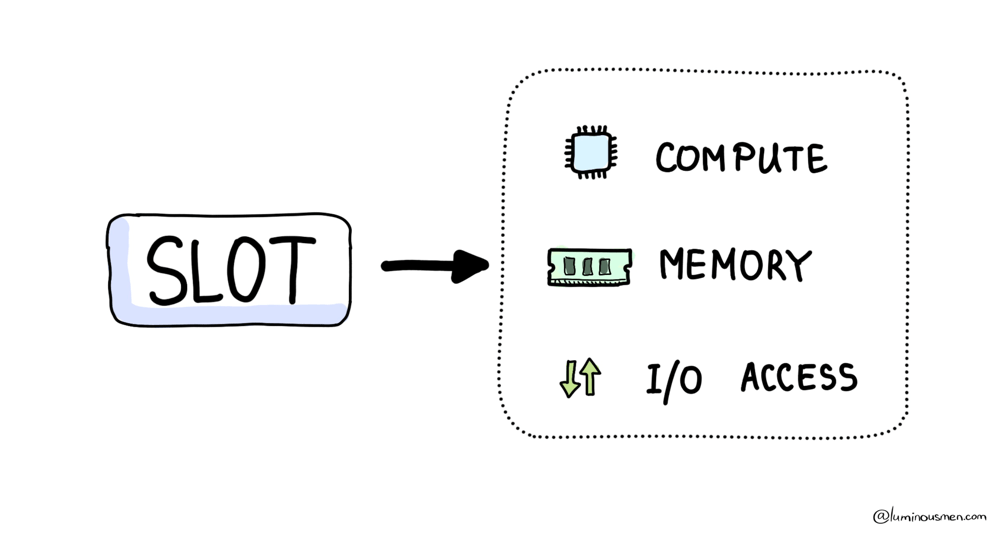
When a query comes in, BigQuery looks at the execution plan, estimates how much parallelism it can use, checks any limits your organization has configured (if any), and then grabs as many of these workers as it can justify. Those slots fan out, chew through the data in parallel, and stay busy until the query finishes. Once it's done, the slots go back into the pool and get reused for something else.
While that query is running, those slots are consuming compute continuously. That consumption is measured as slot-time. It's just how many slots were used multiplied by how long they were active: number of slots × time they were in use.
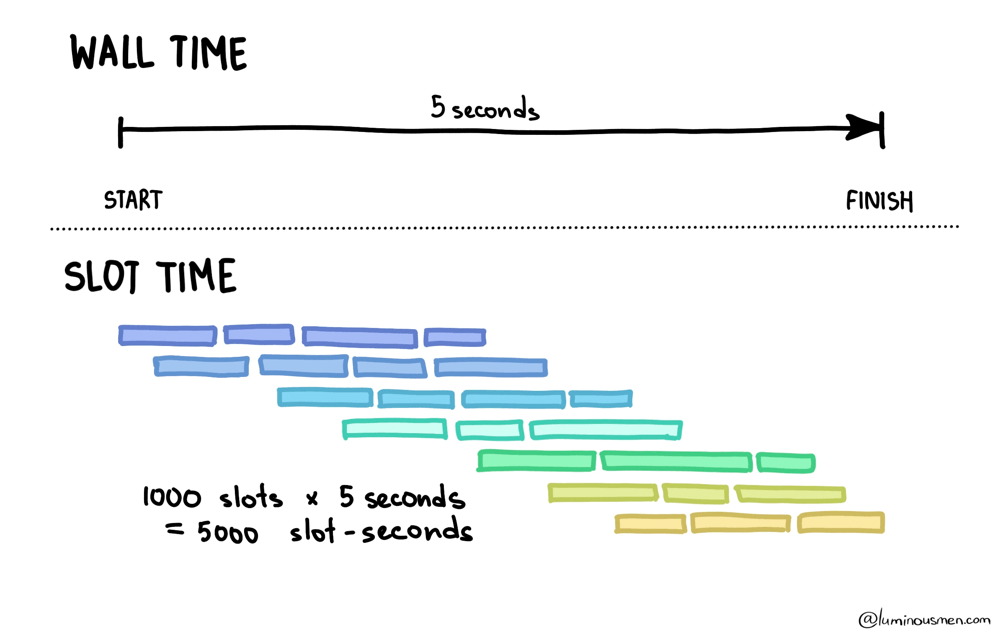
If a query runs for 5 seconds and uses 1,000 slots, that's 5,000 slot-seconds of compute. It feels instantaneous from the perspective of your laptop. But from the platform's perspective, a lot of resources were just burned to make it feel that way.
This is where most confusion comes from — BigQuery always spends slot-time, even when you think you're paying for something else. The important part: pricing models don't change execution. Flat-rate, on-demand, reservations — BigQuery still allocates slots, runs stages, shuffles data, and consumes slot-time. The only difference is when and how explicitly Google charges you for that slot-time.
Once you understand that, the rest of BigQuery's pricing model starts to make more sense.
On-demand
On-demand is the version of BigQuery most people start with, mostly because it asks nothing of you. On-demand is straightforward: you pay by the amount of data scanned. You don't manage slots, you don't buy reservations, and you don't think about concurrency. Just SQL and a bill. Google allocates compute behind the scenes, with quotas and fairness behavior you don't directly control.
From the outside, it looks simple. You pay based on how much data your query scans. Pricing is per terabyte processed, with the exact dollar figure drifting over time and region.
Scan less, pay less. Easy, right?
Here's the catch though: on-demand gives you very limited isolation. You don't get to say "dashboards always win" or "ETL can wait" in a way that's enforced by hard capacity boundaries. And you don't get a clean way to protect BI from the one person who decides today is a good day to join five huge tables "just to explore".
On-demand is great when workloads are small, predictable, or sporadic. It's also what you end up with when a team thinks "observability is optional" and SQL is basically wizardry. There is one important question though…
What counts as "data scanned"?
BigQuery doesn't charge you based on how many rows you get back. It charges you based on how much data it had to read in order to be confident about the answer. That sounds obvious… until you remember that reading is the expensive part, and returning results is often the cheap part.
Every query has a phase that you can't avoid: BigQuery has to go to storage and pull in the raw data it needs to evaluate the query. That storage read is where on-demand billing lives. Everything that happens after — joins, aggregates, shuffles, sorts — still consumes compute and still burns slots, but on-demand pricing mostly ignores that part and focuses on what was read from disk.
So BigQuery is effectively saying: "I'll charge you for what I had to fetch from storage," not for how pretty your SQL is or how small your output looks.
This matters because BigQuery stores data in a columnar format. It doesn't read rows; it reads column chunks (check previous post). If a column appears anywhere in the query plan, BigQuery may need to read that column's chunks for whatever slices of the table it ends up scanning.
That applies far beyond the SELECT list. Columns used in joins, filters, expressions, grouping, ordering — all of them can force data to be read. The engine can't evaluate those operations without touching the underlying storage.
This is why the "bytes processed" number so often feels disconnected from what you see on the screen. You might get back a few hundred rows, or even a handful. But to find those rows, BigQuery may have had to scan billions.
The output is small. The question that led to it was not.
BigQuery also shows you "bytes billed", which isn't always identical to "bytes processed". There's rounding, minimum charges, and other adult supervision applied so tiny queries don't show up as free. Large scans, on the other hand, tend to get billed very literally.
The clean mental model is this: on-demand charges you for storage reads. Storage reads are driven by which column chunks need to be touched across whatever parts of the table the optimizer decides to scan. Billing then applies a few rules so the number doesn't always line up with your intuition.
Flat-rate
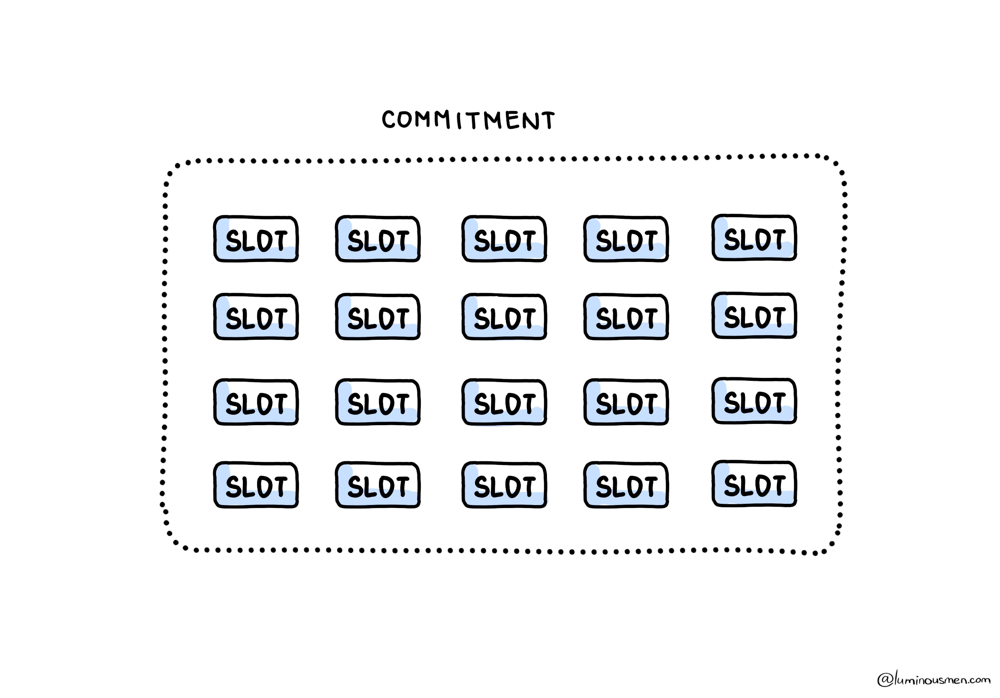
On-demand lets you pretend compute doesn't exist. You pay per bytes billed, and Google quietly figures out how to run your queries for you. With flat-rate, that illusion ends. Instead of paying per terabyte scanned, you start renting compute directly. You buy slots, which makes billing boring and predictable — but it also means performance is now your responsibility.
If on-demand is like taking a taxi ("I pay for the ride"), then flat-rate is like renting a car for the month ("I pay for the month and drive as much as I want"). And guess what happens next — now you need to know how to drive, how traffic works, and what happens when everyone tries to merge at once.
In flat-rate land, inefficient queries don't immediately waste money. They waste time and concurrency. And time plus concurrency is what your stakeholders experience as "BigQuery is slow today", while you're staring at a perfectly flat billing chart wondering why everyone is upset.
You still care about writing efficient queries. You just stop caring in a per-query invoice sense and start caring in a "please don't block prod dashboards because someone ran a backfill at noon" sense.
Flat-rate also changes what "waste" looks like. With on-demand, waste shows up as bill shock. With capacity, you've already paid. So waste often looks like idle slots in the afternoon and traffic jams in the morning. You're not saving money by running fewer queries. You're just failing to use what you already bought.
Slot Math
BigQuery very intentionally does not publish a clean mapping like, "1 slot equals X CPU cores". Slots are abstracted, they change shape. Treating them as hardware is a dead end. Instead, treat them as scheduler currency.
A query consumes slot-time. You can observe that consumption directly as total_slot_ms in job metadata. That number is your comparing metric.
If you've ever seen two queries that both finish in about 30 seconds, but only one of them makes the entire org lag, the difference is almost always slot usage. Wall time tells you how long you waited. Slot time tells you how much compute the system burned to make you happy.
BigQuery exposes both. You should look at them together. Something like this:
SELECT
  job_id,
  user_email,
  creation_time,
  end_time,
  TIMESTAMP_DIFF(end_time, creation_time, SECOND) AS wall_s,
  total_slot_ms,
  total_bytes_processed,
  total_bytes_billed,
  query
FROM `region-us`.INFORMATION_SCHEMA.JOBS_BY_PROJECT
WHERE creation_time >= TIMESTAMP_SUB(CURRENT_TIMESTAMP(), INTERVAL 7 DAY)
  AND job_type = 'QUERY'
ORDER BY total_slot_ms DESC
LIMIT 50;
Once you start sorting by total_slot_ms, a lot of mysteries disappear. You can see who's eating capacity, whether dashboards are slow because the SQL is genuinely bad or because the reservation is starving, and why a query that feels "cheap" from a billing perspective is actually burning terrifying amounts of compute.
Reservations and Assignments
Buying slots is the easy part. Deciding how to slice them up is where flat-rate either saves you or ruins your life. This is where flat-rate stops being "just buy slots" and becomes architecture.
Reservations are BigQuery's way of enforcing boundaries. You're not telling individual queries what to do. You're saying which workloads are allowed to compete with each other, and which ones are not. The scheduler then does its best using those guidelines.
If you don't do this, you're effectively running a shared kitchen with no labels on the food. Everything is "ours" until someone eats your lunch. Literally.
The useful mental picture looks something like this:
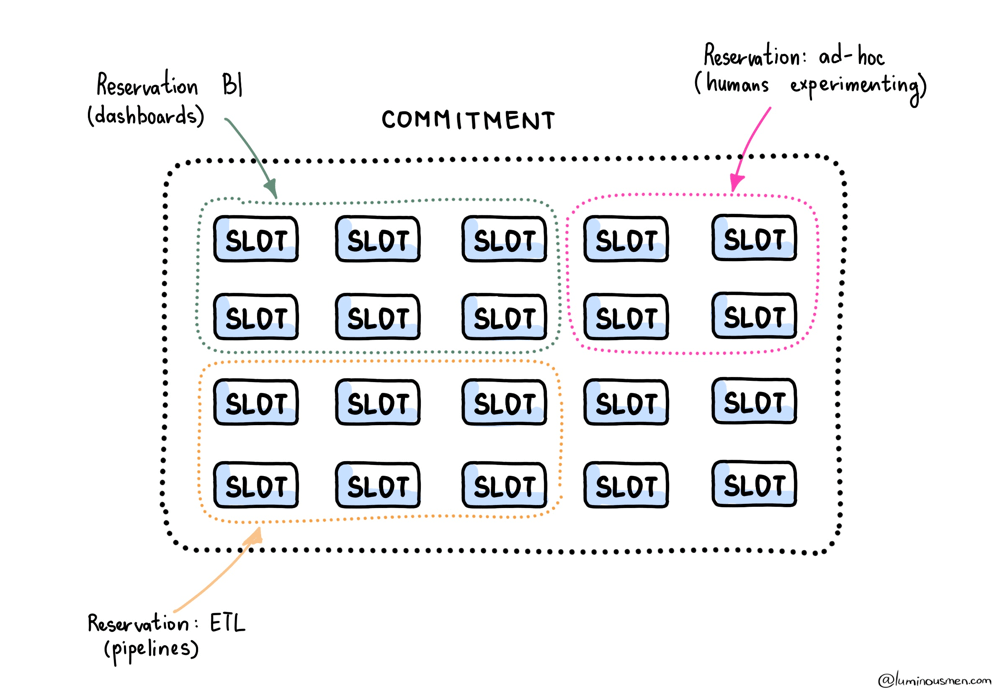
When this is done right, dashboards stop being collateral damage for backfills. ETL can churn all night, and BI stays responsive in the morning when someone decides they need "one more filter" five minutes before a meeting.
When this is done wrong, you get the classic pattern: "The dashboard is slow every day at 10:00". And then you discover that 10:00 is when someone scheduled a full recomputation of the last year of data because it was "simpler".
Assignments are where you stop asking people to behave and start letting the scheduler enforce it for you. You route workloads so that things with the same SLA share capacity, and things with different SLAs don't. That's the whole trick. It's a simple idea, and it's shockingly rare in the wild.
Inside a reservation, the scheduler will try to be fair. In practice, that means a monster backfill doesn't monopolize everything forever. It gets squeezed as other work shows up. The job isn't obviously slow. It's just constantly losing and regaining slots. If you don't separate workloads, you don't get predictability. You get polite throttling.
On flat-rate, expensive queries don't cost more money. You already paid. What they cost is opportunity. Every slot-second one job burns is a slot-second nobody else gets.
The Politics of Slots
Most BigQuery cost and performance problems aren't SQL problems. They're people problems.
If every team runs in the same reservation, you don't have cost optimization. You're relying on everyone to coordinate perfectly, which has always worked out great for humans, historically /s.
So you create boundaries. Not because you're mean, but because you enjoy sleeping and you'd like your dashboards to survive business hours.
In practice, most companies converge on three pools. One for BI that prioritizes low jitter. One for ETL that's allowed to run hot and ugly. And one deliberately constrained ad-hoc pool so curiosity doesn't become an outage. This tends to work better than splitting by "dev vs. prod", because I've seen prod die from dev queries and dev die from prod backfills. The label matters less than the workload behavior and the SLA.
Interactive vs Batch
BigQuery supports job priorities. Interactive jobs try to run immediately. Batch jobs are allowed to wait for idle capacity.
In on-demand mode, almost everything ends up interactive because that's the default and patience is not a common trait in analytics teams.
In flat-rate mode, batch becomes a powerful tool. Backfills, recomputations — anything that can tolerate waiting should be batch. That's how you stop those jobs from punching dashboards in the face during business hours.
Batch does not mean slow. It means, "wait until there are free slots". That's the difference between breaking BI and making good use of the night.
Flex slots
Teams love the idea of buying enough slots for peak usage. Finance hates it. Engineers hate it later, because "peak" inevitably turns out to mean "someone ran a massive backfill with no filter and called it urgent".
Flexible capacity exists for those moments. Short-term slots and autoscaling are there for migrations, backfills, quarter-end chaos, and the occasional week where every PM rediscovers analytics and treats it like a fire drill.
They're not cheaper per unit, of course. You're paying for flexibility. But they're often cheaper than renting a giant baseline you only fully use a few days a month.
To Wrap It Up
BigQuery pricing isn't confusing because the math is hard. It's confusing because the abstraction is too nice. It works just well enough that you can ignore what's happening underneath — right up until ignoring it becomes expensive.
You can't prevent bad queries — someone will always run something expensive, accidentally or otherwise. What you can control is how much damage that query does and how quickly the system recovers.
That's why the mental model matters. Once you understand that everything reduces to slot-time — whether it's hidden behind bytes billed or exposed as capacity — BigQuery stops feeling random. It becomes an engineering system you can reason about, shape, and defend.