
When working with Hive queries on ORC-formatted data, have you ever run into an Out of Memory (OOM) issue during split generation? It's a frustrating problem, and it looks something like this:
java.sql.SQLException: Error while processing statement: FAILED: Execution Error, return code 2 from org.apache.hadoop.hive.ql.exec.tez.TezTask.
Vertex failed, vertexName=Map 11, ...
Caused by: java.lang.OutOfMemoryError: GC overhead limit exceeded
...
Let us walk through the basic concepts of ORC to understand the essence of this phenomenon.
ORC Format Basics: The Foundation
ORC (Optimized Row Columnar) is a columnar data storage format widely used in the Hadoop ecosystem, loved for its compression and performance benefits. ORC is self-describing, meaning it doesn't rely on external metadata (like the Hive metastore). Instead, everything you need to decode its contents is embedded within the file itself.
An ORC file consists of:
- Stripes: Large data chunks designed for sequential reads.
- Indexes: Metadata for each column to quickly locate relevant data.
- Footer: A summary of the file's metadata, including column types and stripe info.
- Postscript: Contains compression options and the footer size.
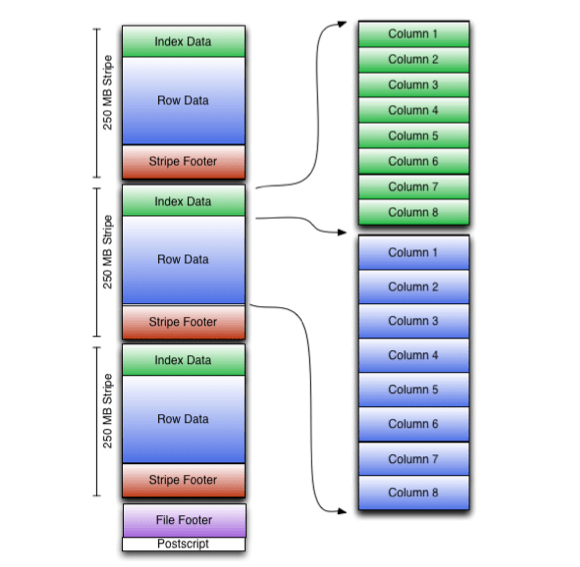
The beauty of ORC lies in its efficiency. For example, the stripe-based design allows Hive to skip irrelevant data when running queries, while column separation enables selective data reading. Together, these features make ORC very powerful but they also come with trade-offs.
Here's the problem: Hive's split calculation process depends heavily on the structure of ORC files, particularly their metadata. The more complex or metadata-heavy your ORC files are, the more memory Hive needs during split generation. And when memory runs out? OOM errors like the one above.
The Split Calculation Process
Before your query even starts processing, Hive calculates how to split your ORC data into manageable chunks. This happens on the client side, even before the actual execution begins, making it particularly vulnerable to memory limits.
Hive's OrcInputFormat offers three strategies for split calculation:
- BI (Business Intelligence): Designed for small, fast queries. It skips reading ORC footers and simply splits data based on HDFS block boundaries. This strategy is fast and lightweight but may lead to suboptimal splits for large datasets.
- ETL (Extract, Transform, Load): Designed for large queries. This strategy reads the ORC footers, applies predicate filtering, and identifies the relevant stripes to process. It's more precise but also memory-intensive.
- Hybrid: A mix of BI and ETL. For small files or small datasets, it defaults to BI. For large files, it switches to ETL.
By default, Hive uses the Hybrid strategy. This seems like a good compromise, but if your workload leans heavily on large ORC files, Hybrid will likely default to ETL. That's where the memory problem starts.
Reading and processing large ORC footers, especially with high column cardinality or complex indexes, can overwhelm the JVM heap, triggering the GC overhead limit exceeded error.
Why OOM Happens in Split Calculation
The root of the problem lies in memory-intensive operations during split generation. For example:
- Metadata Overload: ORC footers can be quite large, especially if your dataset has many columns or uses extensive indexing. Hybrid (or ETL) strategies read these footers upfront.
- Garbage Collection (GC): The JVM struggles to reclaim memory while handling large ORC footers, leading to GC overhead issues.
- Default Configurations: If your cluster's memory settings aren't optimized, even moderate workloads can push the system over the edge.
The Fix
The simplest way to avoid OOM errors during split generation is to switch Hive's ORC split strategy to BI. This prevents Hive from loading the ORC footers upfront, significantly reducing memory usage.
Add this configuration to your Hive settings:
hive.exec.orc.split.strategy=BI
By using BI, Hive skips the heavy-lifting metadata operations. While this might slightly increase processing time later (since some irrelevant data might be read), it's a worthy trade-off when dealing with OOM issues.
Additional Tips
Beyond switching to BI, here are some additional strategies to improve your Hive setup:
Optimize Your ORC Files:
- Avoid overly granular stripes. Large stripes are more memory-efficient for Hive split generation.
- Reduce excessive indexing if not strictly necessary.
Tune JVM and Garbage Collection:
- Increase the heap size for Hive clients (
mapreduce.map.memory.mbandmapreduce.reduce.memory.mb). - Experiment with GC algorithms to better handle metadata-heavy workloads.
Cluster-Level Adjustments:
- Ensure your cluster has sufficient resources for memory-intensive operations.
- Use parallel execution to distribute the workload more effectively.